
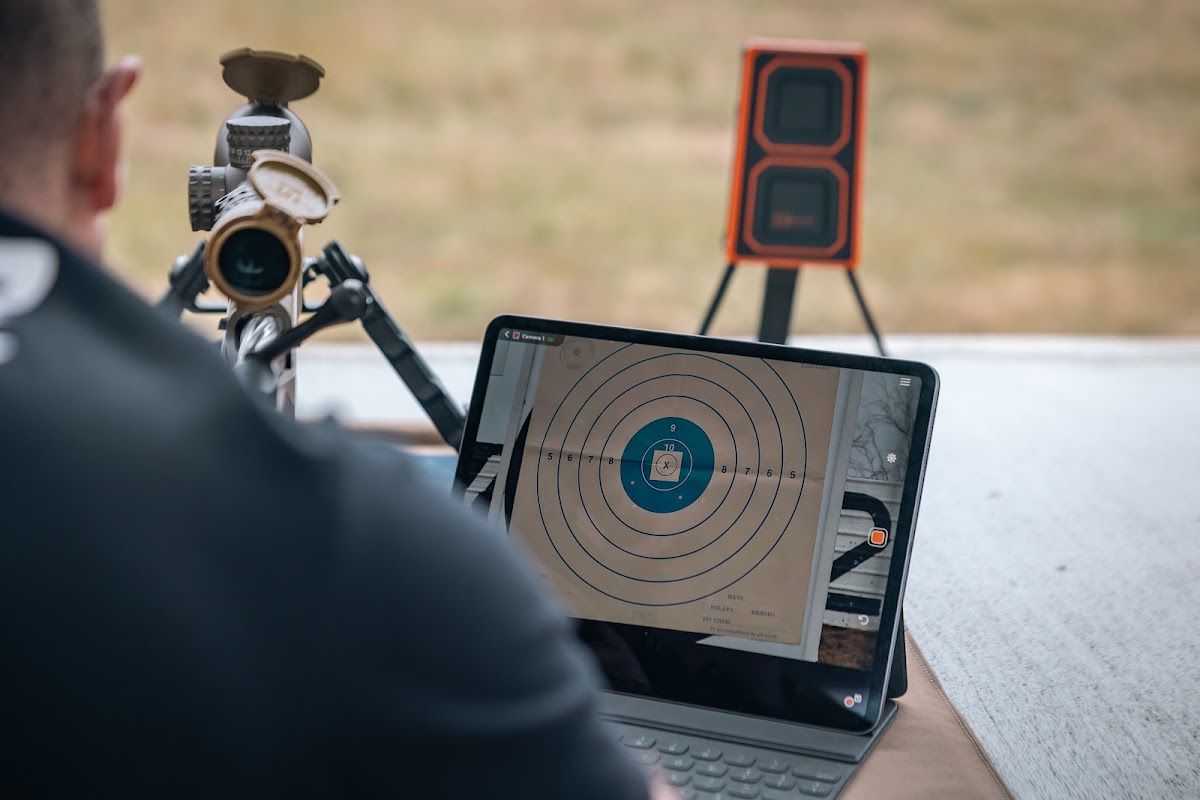
A shooting range app is most useful when it turns live impacts into a clean record: mark each shot, measure the group, save the target, and review the session before packing up. In 2026, the Longshot App streams video from a Longshot camera system directly to a compatible phone or tablet, then lets shooters mark impacts, measure groups, save photos, and record video without relying on cell service or the range’s internet.
TL;DR
- Connect to the camera’s local wireless network before opening the app.
- Use shot markers immediately so a crowded target stays readable.
- Measure groups only after confirming the target image is square and clear.
- Save a labeled photo after each load, zero, or drill.
- In 2026, the best app workflow is simple enough to repeat every range day.
What a useful shooting range app should do
A range app should reduce guesswork, not create another screen to manage. The core jobs are:
- Show the target clearly
- Identify the newest impact
- Mark and number shots
- Measure a group
- Save photos or video
- Keep different strings separate
The Longshot App works with Longshot target cameras and the Hawk spotting-scope camera. The camera creates a direct local network, so the phone or tablet can receive the target feed even when there is no internet connection.
Step 1: Connect before opening the app
Turn on the camera system and let it start fully. On the phone or tablet, open wireless settings and select the camera network. Longshot camera networks use names such as LR3, MARKS, or HAWK followed by the unit identifier. The current quick-start page lists the password as “longshot.”
If the device says the network has no internet, choose to stay connected. That warning is expected: the connection carries the camera video, not internet access. In 2026, also allow the app’s requested local-network and location permissions so the device can communicate with the camera.
Step 2: Frame the target
Open the app and view the feed. Adjust the camera or spotting scope until the target fills the useful part of the screen. Focus optically before adding digital zoom. Keep the target square to the camera when group measurement matters.
A clear frame makes every later step easier. If the image is angled, clipped, or soft, fix it before shooting rather than trying to interpret a poor recording afterward.
Step 3: Mark shots as they happen
After each shot or short string, place a marker on the new impact. Numbering prevents confusion when old holes, pasters, or multiple groups share one sheet. The Longshot App’s Blinker Shot Locator helps identify the newest change on a crowded target. See the detailed workflow in Find Your Last Shot on a Crowded Target.
For a zeroing session, use one marker color or sequence for the first group, make the scope correction, then start a fresh sequence for the confirmation group. Do not mix the before-and-after impacts.
Step 4: Measure the group
The app can measure shot groups, but measurement quality starts with a clear target image and correct reference. Confirm every intended shot is marked and exclude called flyers only if your range notes clearly explain why.
Use the same measurement convention each time. A group size without the shot count, distance, ammunition, and date is incomplete. The 2026 goal is repeatable data, not the smallest isolated number.
Step 5: Save the session
Save a photo after each completed test. A useful filename or note includes:
- Rifle and barrel
- Ammunition or load
- Distance
- Shot count
- Date
- Suppressed or unsuppressed
- Weather or wind note
For load development, save the target image beside the chronograph data from the same string. For competition practice, label the drill and par time. For coaching, save the “before” and “after” groups separately.
[ryze-product] name: Longshot Tablet price: 289.00 url: https://www.longshotcameras.com/products/longshot-tablet image: https://cdn.shopify.com/s/files/1/0371/6873/files/Tablet_327fee74-c789-4b02-8dc3-de83af5bde98.webp?v=1788209001 note: 11-inch Android tablet programmed with the Longshot App and video tutorials. [/ryze-product]

[ryze-product] name: LR-3 - 2 Mile price: 999.00 url: https://www.longshotcameras.com/products/lr-3 image: https://cdn.shopify.com/s/files/1/0371/6873/files/LR-3_02379c72-433b-42f6-9fef-fe32bbd74a06.webp?v=1788206041 note: Long-range camera and receiver system with a two-mile range guarantee and 9+ hour listed runtime. [/ryze-product]

Workflows that save time
Zeroing
Fire a group, mark it, measure its center relative to the aim point, make one deliberate correction, and fire a confirmation group. The saved image gives you a record of both steps. The full process is in Zero Your Rifle Faster With a Target Camera.
Load development
Create one saved target per load. Pair the image with average velocity, standard deviation, extreme spread, and conditions. Do not compare a three-shot target with a ten-shot target as if they carry the same evidence.
Coaching
Mirror the same target view across compatible devices where supported. The coach can call the impact and adjustment without taking over the shooter’s position.
Match review
Record or save the target at the end of each stage or practice block. Add a short note while the conditions and decisions are still fresh.
Common app problems in 2026
“No internet” warning
Stay connected to the Longshot camera network. The network is local by design.
Blank or frozen feed
Confirm the camera is powered, the phone is on the correct network, permissions are allowed, and another remembered network has not taken over.
Hard-to-see screen
Move the phone or tablet into shade, raise brightness only as needed, and use a stand. Screen glare is a display problem, not a camera-focus problem.
Group measurement looks wrong
Recheck target framing, scale reference, shot markers, and whether the target is angled. Compare with the steps in How to Measure Group Size Remotely.
Saved sessions are impossible to find
Use one naming system in 2026. Do not rely on default photo timestamps alone.
Verdict
A shooting range app earns its place when it keeps the shooter behind the firearm and connects each impact to a useful record. The Longshot App does that by combining live target video with markers, group measurement, photos, and video. Use a phone for the lightest setup or a tablet for shared viewing. The screen matters less than the discipline to label and save every session consistently.
Watch the latest Longshot app features
Longshot’s official app video shows how the current interface handles live target viewing, impact marking, group measurement, and session review.
Watch What’s New in the Longshot App, then use the workflow above to mark and measure your next group.
FAQ
Does the Longshot App need internet?
No. It communicates with the camera through a direct local wireless connection.
Is the app available for iPhone and Android in 2026?
Longshot lists compatibility with modern iOS and Android phones and tablets.
Can I mark individual shots?
Yes. The app supports shot markers and numbering.
Can the app measure groups?
Yes. Clear framing and correct shot selection are essential for useful measurements.
Can I record video?
Yes. Longshot lists video recording and saved photos among the app features.
Can multiple people view the feed?
Longshot says multiple compatible devices can connect to the Hawk feed; check the exact camera system and app setup for your use.
Share:
Tall Tripod Target Camera Setup: 2026 Guide
Spotting Scope Camera Adapter: 2026 Guide