
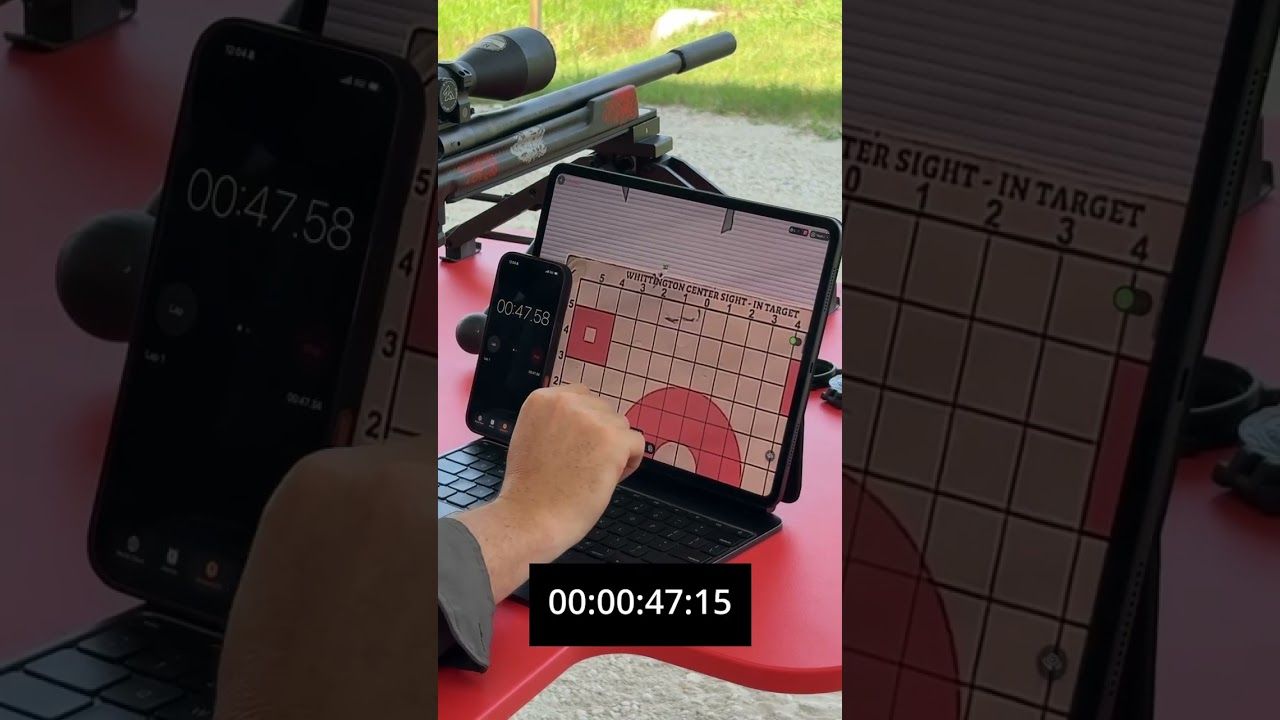
A target camera makes rifle zeroing faster because you can see each impact from the bench, calculate the correction and confirm the result without waiting for repeated target checks. The process uses fewer unknowns: one group, one adjustment and one confirmation.
- A target camera shows your zeroing group from the shooting position.
- Use one stable group before changing the scope.
- The Longshot app includes measurements and zero-adjustment tools.
- Ranger+ covers target viewing up to 1,000 yards.
- LR-3 is the 2-mile option for long-range confirmation.
Why This Matters in 2026
Traditional zeroing slows down when you cannot see the target clearly. You fire, wait for the range to go cold, walk downrange, inspect the paper, return to the bench and rebuild the rifle position. If the first correction is wrong, the cycle starts again.
A Longshot Ranger+ target camera keeps the target visible on your phone or tablet. In 2026, Ranger+ covers target viewing up to 1,000 yards and lets you make the zeroing decision while the original group is still on screen.
Watch Longshot’s official Under 2 Minutes to Zero video to see the basic workflow: shoot a group, read the target, adjust and confirm.
What You’ll Need
- A safe range and a clear paper target.
- A stable rifle rest or shooting position.
- The ammunition you intend to zero.
- A Longshot target camera matched to the distance.
- A charged phone or tablet with the Longshot app.
- The scope’s click value and adjustment directions.
- A simple note for rifle, load, distance and date.
The target camera tells you where the rounds landed. It does not fix an unstable rifle, mixed ammunition or inconsistent aiming.
1. Choose One Zero Distance
Pick the distance required by your rifle setup and intended use. Do not mix a 100-yard zeroing task with long-range confirmation on the same first group.
Set a clean target with a clear aiming point and enough blank paper around it. A larger backer helps catch a first shot that is farther from center than expected.
Expected outcome: One target answers one question: where is this rifle printing at this distance in 2026?
Common mistake: Changing distance before the short-range zero is confirmed.
2. Place the Target Camera
Set the camera only during an authorized cold range. Position it adjacent to the paper and outside the direct line of fire.
For current Longshot downrange cameras, a useful starting position is 10 to 20 feet from the target, adjusted for target size and model instructions. Watch the official camera placement video before setup.
Frame the full target before tightening the view.
Expected outcome: The target fills most of the screen, with enough border to catch a wide first group.
Common mistake: Zooming tightly on the center and losing the first impact outside the frame.
3. Connect Before Loading
Join the correct Longshot network on the phone or tablet. Open the Longshot app and confirm the image is live.
The connection does not need the internet. If the device says the network has no internet access, keep it connected to the Longshot system.
Expected outcome: The live target image is stable before the rifle is loaded.
Common mistake: Letting the phone switch back to range Wi-Fi or cellular service.
4. Fire a Stable Group
Use the same ammunition, point of aim, rest and shooting position for every shot in the first group. The group shows the rifle’s average point of impact better than one unexplained round.
Make the rifle safe before using the screen. Mark the impacts in the app if that helps separate the first group from the confirmation group.
Expected outcome: You can see a clear group location relative to the aiming point.
Common mistake: Adjusting the scope after one shot without confirming whether it represents the group.
5. Measure the Correction
Use the target grid, known target dimensions or the Longshot app’s measurement and reference-point tools. The official Longshot app walkthrough covers measurements, shot markers and zero adjustments.
Translate the target movement into the click value used by the scope. Follow the optic manufacturer’s direction markings.
Expected outcome: You have one elevation correction and one windage correction.
Common mistake: Mixing inches, minutes of angle and milliradians without a clear conversion.
6. Dial One Correction
Make the calculated adjustment once. Record the clicks or turret movement before firing again.
Do not change the rest, ammunition, magnification and scope adjustment together. The 2026 confirmation group should test the turret correction, not a collection of new variables.
Expected outcome: The next group moves toward the intended point of impact.
Common mistake: Turning the turret in the wrong direction because the marked arrow was not checked.
7. Fire a Confirmation Group
Return to the same point of aim and shoot another stable group. View it on the target camera and compare it with the intended zero.
If the group is centered where expected, save a full-target image. If it is not, repeat the measurement and make one more controlled correction.
Expected outcome: You finish with a dated image that confirms the 2026 zero.
Common mistake: Continuing to adjust after the group already meets the rifle’s intended zero.
Ranger+ or LR-3 for Zeroing?
Ranger+ is the compact buy for zeroing and confirmation at distances up to 1,000 yards. The current site lists 1920 x 1080 resolution, a 6-hour battery and a price of $449.
The Longshot LR-3 is the long-range buy when the confirmation distance extends beyond 1,000 yards or the system needs multiple cameras. LR-3 carries a 2-mile guarantee, uses 2688 x 1512 imagery and lists 9 hours of battery life.


Troubleshooting
No impact appears on the target
Widen the camera view and inspect the full backer. Confirm the rifle, bore, optic mounting and target distance before making random turret changes.
The group is too large to measure
Check the shooting position, rest, ammunition and optic mounting. A target camera shows the result clearly but cannot turn an inconsistent group into a reliable zero.
The group moved the wrong direction
Recheck the scope’s marked adjustment direction and the original click count. Return to the recorded setting if needed.
The phone lost the camera network
Reconnect to the Longshot network and tell the device to remain connected even though the network does not provide internet.
The new group overlaps the old group
Use shot markers or the Blinker tool to separate fresh impacts. Save the first group before firing the second.
The target image is blurry
Adjust camera placement within the model guidance and check the lens. Longshot cameras use a fixed-focus lens, so the camera-to-target distance controls the view.
FAQ
Can a target camera help zero a rifle faster?
Yes. It shows each group from the bench, so you can measure, adjust and confirm without repeated target walks.
How many shots should I fire before adjusting?
Use a stable group rather than reacting to one unexplained shot. The exact group size depends on your rifle and zeroing process.
Does the Longshot app calculate scope adjustments?
The Longshot app includes measurement, reference-point and zero-adjustment tools that support the correction process.
What Longshot camera works for a 1,000-yard zero check?
Ranger+ supports target viewing up to 1,000 yards and currently costs $449.
What Longshot camera works beyond 1,000 yards?
LR-3 carries a 2-mile guarantee and starts at $999 for long-range and ELR target viewing.
Do I need Wi-Fi to zero with a Longshot camera?
No. The camera system creates its own wireless connection and does not require existing Wi-Fi or cell service.
Can I save proof of the final zero?
Yes. Save a full-target image in the Longshot app with the date, rifle, load and distance.
One Last Thing
Faster zeroing does not mean rushing. It means removing the dead time between the shot and the information. In 2026, a Longshot target camera keeps the target in front of you so every correction has a clear reason.
Share:
Can’t See Bullet Holes at Long Range? | 2026
No Wi-Fi at the Range? Longshot Still Works | 2026