
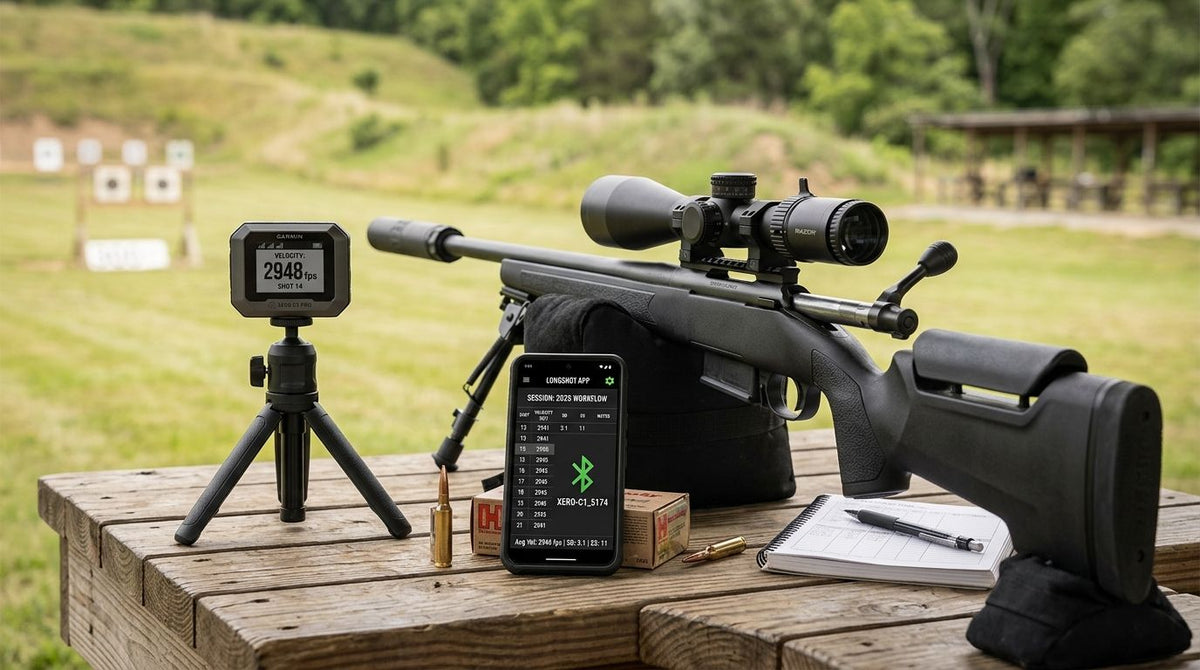
Running a Garmin Xero chronograph next to a Longshot target camera means two separate devices logging two separate things — muzzle velocity on one screen, impact location on another — and neither one talks to the other automatically. Instead of squinting through a spotting scope while trying to remember which velocity reading matched which hole, run both devices on the same shot string and log them side by side using shot number as the shared key.
- The garmin xero chronograph longshot app workflow pairs two independent devices, not one synced system.
- Match Garmin Xero velocity readings to Longshot LR-3 camera impacts using shot number, not a data cable.
- The Longshot side needs no Wi-Fi or cell service — the camera and Longshot Tablet run on their own signal.
- Longshot's SpeedTracker Mach IV Chronograph and LabRadar LX are in-house alternatives if you want one vendor.
- Calling out shot numbers out loud during the string is the single habit that keeps this workflow accurate.
Why this matters
A chronograph tells you speed. A target camera tells you where the bullet landed. Neither tells you the other, and most reloaders end up guessing which impact belongs to which charge weight halfway through a ladder test.
The Longshot LR-3 target camera shows impacts live on a paired tablet up to 2 miles downrange, no walking required. Add a Garmin Xero chronograph at the muzzle and you have both halves of a load-development or zero-confirmation session in 2026 — you just connect them yourself, on paper or in a spreadsheet, because there is no direct software bridge between the two brands.
That is not a knock on either device. It is the honest starting point for a workflow that actually works instead of one that promises a sync feature nobody ships.
Before you start
- A Garmin Xero chronograph, mounted and zeroed per its own setup instructions, ready to start a fresh string.
- A Longshot camera (LR-3 or Marksman) paired to a Longshot Tablet through the app-based software, positioned downrange and aligned with your target board.
- The gotcha: nothing bridges Xero data into the Longshot app automatically. If you do not assign a shot number to every round before you pull the trigger, you finish the string with two lists you cannot match back up.
Set up your Longshot target camera and tablet
- Mount the camera downrange, aligned with your target, and use the All-Axis Camera Adjustment to level the frame over any berm or barrier in the way.
- Power on the camera and pair the Longshot Tablet through the app-based software — it works on both iOS and Android.
- Confirm the feed is live. CrispEdge imagery renders at 2688 x 1512, sharp enough to call bullet holes at distance without zooming a spotting scope.
- Watch for the Blinker Shot Locator to flag each new impact as it lands, so you are not hunting for the newest hole on a crowded target.
Expected result: live target video on the tablet at the shooting bench, a blinking marker on the most recent hole, and zero Wi-Fi or cell signal needed to make any of it work.
Set up your Garmin Xero chronograph
- Mount the Xero at the distance and angle Garmin specifies for your setup, ahead of the muzzle.
- Start a new string in the Xero's own app before the first round of the session — do not fire before the string is live.
- Fire the first shot and confirm a velocity reading registers before continuing.
Expected result: a running per-shot velocity log tied to that session, completely separate from anything happening on the Longshot side of the bench.
Correlate velocity and impact data
This is the actual workflow — the part that turns two logs into one usable data set.
- Call out the shot number before every trigger pull: shot one, shot two, and so on, out loud or written on a card.
- Watch the Longshot Tablet for the Blinker Shot Locator to confirm the impact registered before moving to the next round.
- After the string ends, pull the Xero's velocity list in shot order.
- Match each velocity to its impact position on the Longshot Tablet screen, shot number by shot number.
Expected result: one row per shot, velocity from the Xero next to impact location or group position from the Longshot camera — the complete garmin xero chronograph longshot app workflow in a single sheet.
“If your shot numbers do not match on both devices, the whole workflow falls apart — that is the one rule that actually matters here.”
Ladder tests and load development (the second workflow)
Run the same setup during a powder ladder test and the payoff compounds. Throw each charge weight with a Longshot Precision Trickler for consistent increments, log the Xero velocity for that charge, then check group size and position on the Longshot camera before moving to the next weight.
By the end of a 10-charge ladder you have velocity, group size, and point of impact for every increment — the data set that actually decides a load in 2026, not just a chronograph printout.
Chronograph options for this workflow
| Chronograph | Data output | Pairs with Longshot workflow | Best for |
|---|---|---|---|
| Garmin Xero | Per-shot velocity, string average | Manual shot-number matching, no direct sync | Shooters already inside Garmin's ecosystem |
| Longshot SpeedTracker Mach IV Chronograph | Per-shot velocity | Same manual matching, sold alongside Longshot's own camera lineup | Shooters who want one vendor for camera and chronograph |
| LabRadar LX | Radar-based velocity | Manual matching, mounts near LR-3 bench setups | Shooters already running LabRadar for load development |
Garmin Xero pairs with a Longshot camera through shot numbering, not software — that is the honest version of this workflow in 2026, and it still beats writing numbers on a notepad.
Pros of running the two together: you get muzzle velocity and terminal impact from one string, and the Longshot side needs no signal at rural ranges. Cons: the correlation is manual, and one skipped shot number costs you the whole string.


Troubleshooting
- The Xero misses a reading on a fast follow-up shot. Pace the string. Chronographs need a beat to reset between rounds, especially in a rapid string.
- Shot numbers drift out of sync mid-string. Stop, confirm the last logged number on both devices, and restart the count from there instead of guessing forward.
- The Longshot Tablet drops pairing mid-session. Power-cycle the camera and re-pair through the app-based software before restarting the string.
- Bright backlighting skews chronograph readings. Reposition the Xero so it is not pointed directly into low sun or a bright sky.
- Impacts are hard to call at long range. The Blinker Shot Locator flags the newest hole automatically, which solves most of what a spotting scope struggles with past 300 yards.
Customize your workflow
Running this at an indoor bench instead of a field range changes almost nothing about the process: mount both devices the same way, log the same shot numbers, skip worrying about mirage. Shooting alone changes nothing either — the camera is the spotter.
For the camera side before your first session, work through the Longshot target camera setup guide. If you are choosing a chronograph for reloading rather than pairing an existing Xero, the chronograph guide for precision reloaders covers what each option actually measures.
FAQ
Does the Longshot app sync directly with a Garmin Xero chronograph?
No. The Longshot app and the Garmin Xero run as two independent systems in 2026. You match their data manually using shot number as the shared key, not a cable or Bluetooth bridge.
What do I need for the garmin xero chronograph longshot app workflow?
A Garmin Xero chronograph mounted at the muzzle and a Longshot camera paired to a Longshot Tablet downrange. Both run independently and you correlate the two logs by shot number after the string.
How far can a Longshot target camera see bullet impacts?
The Longshot LR-3 is guaranteed to view impacts up to 2 miles downrange at 2688 x 1512 resolution. The Marksman covers shorter distances for bench and indoor setups.
Do I need Wi-Fi or cell service to run a Longshot camera?
No. Longshot cameras and the paired tablet operate with no Wi-Fi or cell service. That matters at rural ranges where the chronograph already runs on its own signal.
Can I use a LabRadar or the Longshot SpeedTracker Mach IV instead of a Garmin Xero?
Yes. Both work with the same manual shot-numbering workflow described here, since neither has a direct software sync with the Longshot app either.
What is the Blinker Shot Locator on Longshot cameras?
It is a feature that flags the newest bullet impact on the live target feed. It lets you confirm a hit before moving to the next shot in a string without hunting across a crowded target.
Is this workflow only for reloading, or also for hunting zero checks?
Both. Reloaders use it to pair velocity and group data across a ladder test. Hunters use the same shot-numbering method to confirm a zero at distance without a spotter downrange.
What happens if the chronograph misses a shot mid-string?
Stop the string and note the last confirmed shot number on both the Xero and the Longshot Tablet. Restart the count from that point instead of guessing which readings line up.
One last thing
The habit that makes or breaks this entire setup is not a setting on either device. It is calling the shot number out loud before every trigger pull. Skip that on a 20-shot ladder test in 2026 and you finish with a velocity list and an impact log that do not line up, and no app fixes a shot count you lost at round 11.
Share:
Long Range Shooting Gear Search Demand by Category 2026
Best Scope Camera for Long-Range Shooting (2026)